Showing posts with label video editing. Show all posts

19 August, 2019

Video Stabilization in Blender 2.8


In this video, we will be fixing our shaky or unstable footage using Blender 2.8 (download 2.8 here). To stabilize our videos, we only need a few tracks and a single node.

If you would like to follow along, you can download the video here

We will need One Track for the Location (though I like to add a few, just to give Blender more information), and Two Tracks for the Location.


 When adding the Location Track(s), it's a good idea to place them in the middle of the video or the "focal point"

I use three Tracks for the Location but you only need one. 


When adding the Location Tracks, you want to place one on each side of the screen. 

As you can see the Marker on the right is not exactly at the right edge of the screen, like the one on the left but this is fine and Blender has enough information to stabilize the video. 
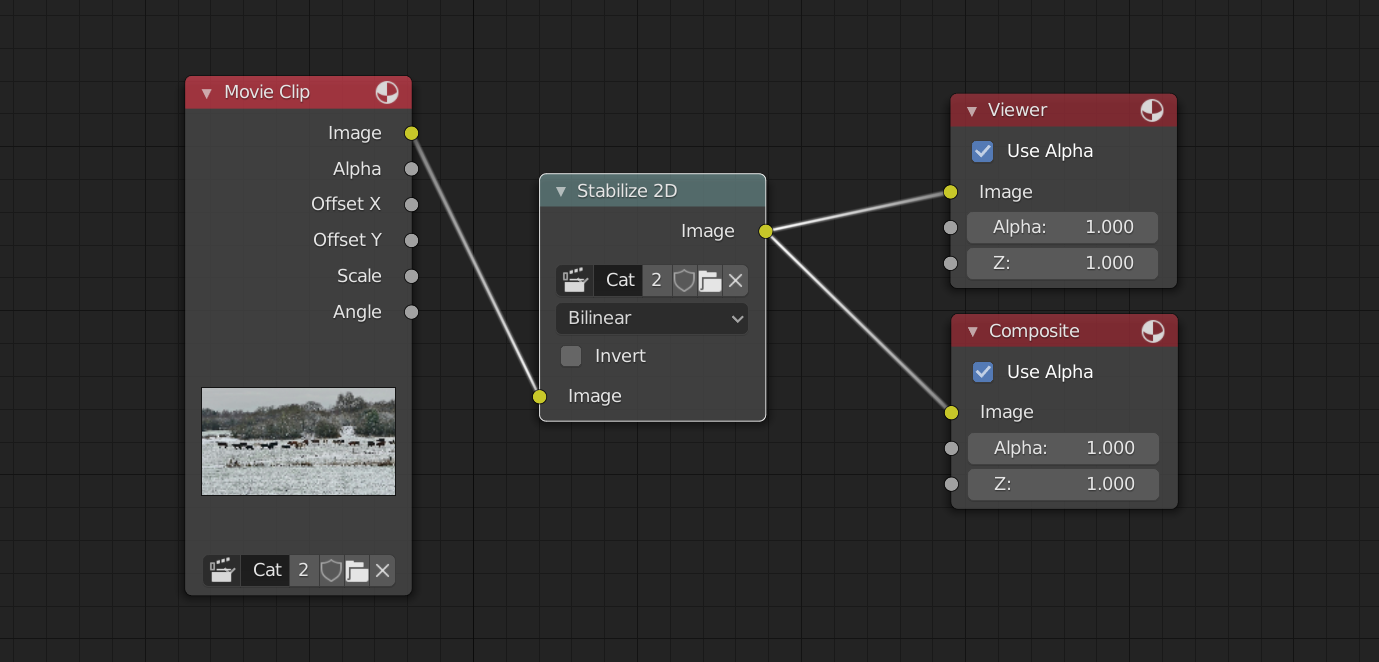


Once we have changed a few settings we can jump to the Compositor and apply the Stabilization effect to our Video. 

I hope this tutorial helps with your projects and as always, Thanks for reading!.

01 April, 2019

How to Remove People from Video [Blender 2.8]


In this video we will be revisiting a former Tutorial, "How to remove people / objects from video", only this time in 2.8. There are some differences between version 2.79 and 2.8, along with some improvements to our workflow. 

Watch the Tutorial here.

In this example video we have a few more things we need to remove and I think we did a pretty good job. Of course  if you spend more time on your project you can make it look even better. 

The video quality was not the best and then with Compression it looks even worse, so be sure to use high quality Background Videos when you are working on your own projects. 

Since we have a few  people we want to remove from our video, we will be creating "Super Nodes" or Mega/Uber Nodes to help speed up our workflow. Once we have created a new Node Group (Which I decided to call it the Patch Node..) we can bring that node into future projects and save even more time. 

I hope this technique helps you in your future projects! if you found this helpful be sure to hit that subscribe button for more.. 

As always, thanks for watching!. 

Links

Facebook

Background Video